finaddress is a Web REST API service built by
Finity Consulting Pty Ltd (Finity) to provide address validation and address
cleansing services across Australia. It also provide access to our other
proprietary products such as finperils, finpoint and Defin’d.
You can access our demonstration site at https://www.finaddress.com.au
Please contact Finity to organise a test token.
High Level Design
Figure 1 shows the high level design of the Address
Validation process:
Figure 1 – GNAF Address Validation Process

Summary
Search for addresses that match the search string
provided. The service will respond with a list of suggested addresses which can
be used to look up further detail in the Address Finder service.
Request Information
HTTP Method: GET
URI: api/AddressSearch/{search string}/
|
Type
|
Name
|
Description
|
|
URI Param
|
Search string
|
The string is required to search. The search string should be URI encoded and then any forward slash (/), and (&) characters should be replaced with underscore (_)
|
|
Header
|
token
|
A valid token is required to access the service, please contact Finity for more information about getting a token.
|
|
Header
|
GNAF_Version
|
Specify the GNAF Version to use, such as “202205”.
|
|
Header
|
finaddress_memo
|
Optional. If this parameter specified then it will be added into the response headers. It will also be recorded in the billing system, as a billing reference.
|
Response Information
Success
If the query is successful, a list of Encrypted_GNAF_PIDs
and addresses will be returned.
Status: 200
Body: Array<AddressSearchResponse>
|
Type
|
Name
|
Description
|
|
URI Param
|
Search string
|
The string is required to search. The search string should be URI encoded and then any forward slash (/), and (&) characters should be replaced with underscore (_)
|
|
Header
|
token
|
A valid token is required to access the service, please contact Finity for more information about getting a token.
|
|
Header
|
GNAF_Version
|
Specify the GNAF Version to use, such as “202205”.
|
|
Header
|
finaddress_memo
|
Optional. If this parameter specified then it will be added into the response headers. It will also be recorded in the billing system, as a billing reference.
|
Failure
Status: 403 or 400
Body: See section “Response Fail Reasons” for a
description of the different error messages that can be expected.
Example
Request:
https://www.finaddress.com.au/api/AddressSearch/12_4,%20Bar/
Response:
|
[
{
"GNAF_PID": "pF4n5gr013e0gozByLhCQ1=",
"Address": "SE 12 40 BLACKALL STREET BARTON ACT 2600 "
},
{
"GNAF_PID": "pF4n5gr013e0gozByLhCQ8=",
"Address": "SE 12 40 BRISBANE AVENUE BARTON ACT 2600 "
}
]
|
Summary
The client can retrieve the detail information using a
previously retrieved Encrypted_GNAF_PID. Every successful call to the server
will be recorded as a chargeable item.
Request Information
HTTP Method: GET
URI: api/AddressFinderController/{Encrypted_GNAF_PID}/
|
Type
|
Name
|
Description
|
|
URI Param
|
Encrypted_GNAF_PID
|
The Encrypted_GNAF_PID from the response of Address Search
API
OR
GNAF_PID if it is available already.
OR
The raw address search string, such as “68 HARRINGTON STREET THE ROCKS NSW 2000”
|
|
Header
|
token
|
A valid token is required to access the service, please
contact Finity for more information about getting a token.
|
|
Header
|
GNAF_Version
|
Specify the GNAF Version to use, such as “202205”.
|
|
Header
|
finaddress_memo
|
Optional. If this parameter specified then it will be
added into the response headers. It will also be recorded in the billing
system, as a billing reference.
|
Response Information
Success
If the query is successful, the related products information
will be available in the “Elements” field.
Status: 200
Body: AddressFinderResponse
|
AddressFinderResponse
|
|
Field
|
Type
|
Description
|
|
CustomerKey
|
String
|
Optional: The key used to identify the customer making
the request
|
|
Find_Address
|
String
|
A unique identifier for the address
|
|
GNAF_PID
|
String
|
A unique identifier for the address
|
|
GNAF_Address
|
String
|
A single line string for the address
|
|
ConfidenceScore
|
String
|
Numeric score indicating the confidence in the accuracy
of the result
|
|
Elements
|
Array<Datapoint>
|
An array of Element records
|
|
Datapoint
|
|
Field
|
Type
|
Description
|
|
Product
|
String
|
The name of the product the data point relates to
|
|
Field
|
String
|
The name of the data point
|
|
Value
|
String
|
The value of the field described by the data point, In cases where the value is null, this field
will be represented as "NA".
|
Note: To search
for specific values, please use a combination of the product and the field. The
same field name may be used in different products. New products, such as recently
subscribed products, may be included in the API response without prior notice.
Failure
Invalid Encrypted_GNAF_PID
Status: 400
Body:
|
{
"ContentError":"Bad
Encrypted_GNAF_PID"
}
|
Other Errors
Status: 403 or 400
Body: See section “Response Fail Reasons” for a description of
the different error messages that can be expected.
Example
Request:
https://www.finaddress.com.au/Api/AddressFinderController/pF4n5gr013cI8v8CBNhcIYrneHbUogWTOe5ckLVBJOY=/
Response:
|
{
"CustomerKey": null,
"Find_Address": "GAACT714400000",
"GNAF_PID": "GAACT714400000",
"GNAF_Address": "12 BARKER STREET GRIFFITH ACT 2603 ",
"ConfidenceScore": "999",
"Elements": [
{
"Product": "Base",
"Field": "GNAF_Address",
"Value": "12 BARKER STREET GRIFFITH ACT 2603 "
},
{
"Product": "Base",
"Field": "SA1_2011",
"Value": "80106106403"
}
]
}
|
High Level Design
The batch address cleaning is initiated by sending a
request to clean multiple addresses. The service returns a reference to the
future response to this request. The caller then polls the status service with
the reference to check if the result is ready. Once the response is ready they
then call the results service to download the results.
Figure 2 below shows the high level of design in the batch
address cleaning process:
Figure 2 – Batch Address Cleaning Process

Summary
The client can submit multiple raw addresses and the
finaddress server will create a batch cleaning job. The service returns a job
reference which should be used to check the status of the job and to download
the results.
HTTP Method: POST
URI: api/AddressBatchFinder
|
Type
|
Name
|
Description
|
|
Body
|
N/A
|
A JSON list of strings. The string contains a customer key
and a raw address, separated by a pipe (|) character.
The customer key can be used for linking the result back
to the origin dataset.
Raw address can be a GNAF_PID, if it is available.
Recommend batch size no more than 10K records. Bigger
than 10K batch can be split into smaller batches.
|
|
Header
|
token
|
A valid token is required to access the service, please
contact Finity for more information about getting a token.
|
|
Header
|
GNAF_Version
|
Specify the GNAF Version to use, such
as “202205”.
|
|
Header
|
Content-Type
|
application/json
|
Where the request string is constructed as follows: (also
see example request below)
String(customer
key)|String(address)
Response Information
Success
If the request is successful, then a job reference will be
returned and the batch address cleaning is initiate. This reference can be used
to query the job status and retrieve all results.
Status: 200
Body: Number
Failure
Status: 403 or 400
Body: See section “Response Fail Reasons” for a
description of the different error messages that can be expected.
Example
POST: https://www.finaddress.com.au/Api/AddressBatchFinder
Request Body:
|
[
"Address 1|68 HARRINGTON STREET THE ROCKS NSW 2000",
"Address2|3/3 Collins Street Melbourne 3000",
"Address3|91 King William Street Adelaide SA 5000"
]
|
Response Body:
Summary
The client uses this service to monitor the status of a
job previously submitted by sending the job reference number in with the
request.
Request Information
HTTP Method: GET
URI: api/AddressBatchFinder/CheckStatus/{job
reference}
|
Type
|
Name
|
Description
|
|
URI Param
|
Job reference
|
The job reference returned by “Submit Batch” API
|
|
Header
|
token
|
A valid token is required to access the service, please
contact Finity for more information about getting a token.
|
All the query batch requests should have couple seconds
interval between them.
Response Information
Success
If the query is successful one of the following response
will be returned. The client should inspect the result to determine whether the
results are ready or not.
|
Response
|
Description
|
|
[
"${number1}/${number2} (current speed ${number3} per minute)"
]
|
The job is still in progress.
· Number1 is the number addresses that were processed most recently.
· Number2 is the total number of address yet to process.
· Number3 is the number of addresses being processed per minute.
|
|
[“Completed”]
|
The job is complete and the client can go ahead and download the results using the “Download Batch Results API”
|
Failure
Invalid job reference
Status: 400
Body:
|
{"ContentError":"Job Id not exist or under a different
client"}
|
Other Errors
Status: 400 or 403
Body: See section “Response Fail Reasons” for a
description of the different error messages that can be expected.
Example
Request:
GET https://www.finaddress.com.au/api/AddressBatchFinder/CheckStatus/123
Response:
|
[
"125/565
(current speed 30 per minute)"
]
|
Job 123 is still in progress. It has completed 125 out
of 565 addresses and the rate is 30 per minute
|
|
[
"Completed"
]
|
Job 123 is complete
|
Summary
The client can get the final results using a job reference
of a previously completed job. The results include every address that was
submitted in the batch request.
Every successful call to the server will be recorded as a chargeable
item.
The results need to be downloaded in 24 hours after the
job is created. Otherwise, the results maybe archived and not available any
more. In this case, please contact finaddress@finity.com.au
.
Request Information
HTTP Method: GET
URI api/AddressBatchFinder/{jobid}
Response Information
Success
If the query is successful, a list results for each address
is returned. The structure of each array element is the same as that returned
for a single response by the “Address Finder” API.
Status: 200
Body: Array< AddressFinderResponse>
Failure
Status: 400 or 403
Body: See section “Response Fail Reasons” for a
description of the different error messages that can be expected.
Example
Request:
GET https://www.finaddress.com.au/api/AddressBatchFinder/123
Response:
|
[
{
"CustomerKey": "776571H",
"Find_Address": "68 HARRINGTON STREET THE ROCKS NSW
2000",
"GNAF_PID": "GANSW718844175",
"GNAF_Address": "68 HARRINGTON STREET THE ROCKS NSW 2000
",
"ConfidenceScore": "999",
"Elements": [
{
"Product": "Base",
"Field": "GNAF_Address",
"Value": "68 HARRINGTON STREET THE ROCKS NSW 2000 "
}
]
},
{
"CustomerKey": "1165498H",
"Find_Address": "3/3 Collins Street Melbourne 3000",
"GNAF_PID": "GAVIC423823607",
"GNAF_Address": "1 - 9 COLLINS STREET MELBOURNE VIC 3000
",
"ConfidenceScore": "949",
"Elements": [
{
"Product": "Base",
"Field": "GNAF_Address",
"Value": "1 - 9 COLLINS STREET MELBOURNE VIC 3000 "
},
{
"Product": "Base",
"Field": "SA1_2011",
"Value": "20604112230"
}
]
}
]
|
A. Response
Fail Reasons
If there is an error either as a result of invalid input
or some server condition then one of the following messages will be included in
the response body.
The JSON object returned will contain one of the following
keys and a description to explain what caused the error condition:
·
AuthError
·
AllowanceError
·
InternalServerError
·
ContentError
The client should inspect every response and check whether
any of the above keys exist and if they do treat the response as an error.
Example error responses
|
Status
|
Response
|
Reason
|
|
403
|
{"AuthError":"Token
does not Exist"}
|
The token
request header is not present
|
|
|
{"AuthError":"Invalid Token"}
|
A token was found in the
request header, but it was invalid.
A token is invalid if:
·
It has expired
·
Domain which the request originated from does not match the
domain the token was created for
|
|
403
|
{"AuthError":"Authentication
Denied"}
|
A token
was found in the request header, but it was unable to pass the
Authentication.
Authentication will fail when:
·
Performing action on a wrong ID, such as accessing some other
clients’ batch converting results.
·
Performing action which the token is not allowed to, such as
ReverseGeo
|
|
403
|
{
"AllowanceError":"exceed
monthly allowance for the token fin_perils"
}
|
The request exceeded the monthly allowance on one of the
products included in the request.
Please contact Finity to increase the monthly allowance.
|
|
400
|
{"ContentError":"Missing
GNAF-Version in request head"}
|
When a request header is missing.
|
|
400
|
{"ContentError":"Format
is not correct"}
|
When a request with unexpected format in its contents,
system will return this message.
|
|
500
|
{
"InternalServerError":"Unexpected Error, please try again later."
}
|
An unexpected error occurred. The error was logged and
this message is returned to the client.
These errors are rare and in most cases the error can be resolved by retrying
the request.
If the errors like these happen often please contact
Finity to resolve the problem.
|
finaddress is a Web REST API service built by
Finity Consulting Pty Ltd (Finity) to provide address validation and address
cleansing services across New Zealand. It also provide access to our other
proprietary products such as finperils.
You can access our demonstration site at https://www.finaddress.com.au/home/nz
Please contact Finity to organise a test token.
High Level Design
Figure 1 shows the high level design of the Address
Validation process:
Figure 1 – FNAF Address Validation Process
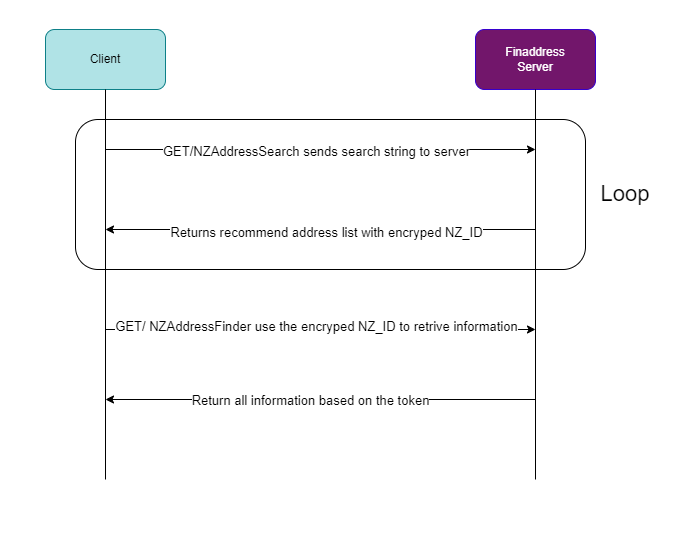
Summary
Search for addresses that match the search string
provided. The service will respond with a list of suggested addresses which can
be used to look up further detail in the FNAF Address Finder service.
Request Information
HTTP Method: GET
URI: api/NZAddressSearch/{search string}/
|
Type
|
Name
|
Description
|
|
URI Param
|
Search string
|
The string is required to search. The search string
should be URI encoded and then any forward slash (/), and (&) characters
should be replaced with underscore (_)
|
|
Header
|
token
|
A valid token is required to access the service, please
contact Finity for more information about getting a token.
|
|
Header
|
NZ_Version
|
Specify the FNAF Version to use, such as “202209”.
|
|
Header
|
finaddress_memo
|
Optional. If this parameter specified then it will be
added into the response headers. It will also be recorded in the billing
system, as a billing reference.
|
Response Information
Success
If the query is successful, a list of Encrypted_NZ_IDs
and addresses will be returned.
Status: 200
Body: Array<NZAddressSearchResponse>
|
NZAddressSearchResponse
|
|
Field
|
Type
|
Description
|
|
NZ_ID
|
String
|
The Encrypted_NZ_ID to use when looking up the
address details using Address Finder
|
|
Address
|
String
|
The address string that is a potential match for the
search string
|
Failure
Status: 403 or 400
Body: See section “Response Fail Reasons” for a
description of the different error messages that can be expected.
Example
Request:
https://www.finaddress.com.au/api/NZAddressSearch/12_4,%20Bar/
Response:
|
[
{
"NZ_ID": "AC1DcF3gOwoVleH10043H1ar9P1BDMM1yIXg",
"Address": "FLAT 12 4 BAFFLES CRESCENT SILVERDALE HAMILTON 3216"
},
{
"NZ_ID": "AC1DcF3gOwo6TTD2M825qEaZ310043510043abn10047",
"Address": "FLAT 12 4A BAFFLES CRESCENT SILVERDALE HAMILTON 3216"
}
]
|
Summary
The client can retrieve the detail information using a
previously retrieved Encrypted_NZ_ID. Every successful call to the server
will be recorded as a chargeable item.
Request Information
HTTP Method: GET
URI: api/NZAddressFinderController/{Encrypted_NZ_ID}/
|
Type
|
Name
|
Description
|
|
URI Param
|
Encrypted_NZ_ID
|
The Encrypted_NZ_ID from the response of FNAF Address Search
API
OR
NZ_ID if it is available already.
OR
The raw address search string, such as “79 Queen Street Auckland 1010”
|
|
Header
|
token
|
A valid token is required to access the service, please
contact Finity for more information about getting a token.
|
|
Header
|
NZ_Version
|
Specify the FNAF Version to use, such as “202209”.
|
|
Header
|
finaddress_memo
|
Optional. If this parameter specified then it will be
added into the response headers. It will also be recorded in the billing
system, as a billing reference.
|
Response Information
Success
If the query is successful, the related products information
will be available in the “Elements” field.
Status: 200
Body: NZAddressFinderResponse
|
NZAddressFinderResponse
|
|
Field
|
Type
|
Description
|
|
CustomerKey
|
String
|
Optional: The key used to identify the customer making
the request
|
|
Find_Address
|
String
|
A unique identifier for the address
|
|
NZ_ID
|
String
|
A unique identifier for the address
|
|
NZ_Address
|
String
|
A single line string for the address
|
|
ConfidenceScore
|
String
|
Numeric score indicating the confidence in the accuracy
of the result
|
|
Elements
|
Array<Datapoint>
|
An array of Element records
|
|
Datapoint
|
|
Field
|
Type
|
Description
|
|
Product
|
String
|
The name of the product the data point relates to
|
|
Field
|
String
|
The name of the data point
|
|
Value
|
String
|
The value of the field described by the data point, In cases where the value is null, this field
will be represented as "NA".
|
Note: To search
for specific values, please use a combination of the product and the field. The
same field name may be used in different products. New products, such as recently
subscribed products, may be included in the API response without prior notice.
Failure
Status: 403 or 400
Body: See section “Response Fail Reasons” for a description of
the different error messages that can be expected.
Example
Request:
https://www.finaddress.com.au/Api/NZAddressFinderController/AC1DcF3gOwoVleH10043H1ar9P1BDMM1yIXg/
Response:
|
{
"CustomerKey": null,
"Find_Address": "NZP1232834",
"NZ_ID": "NZP1232834",
"NZ_Address": "FLAT 12 4 BAFFLES CRESCENT SILVERDALE HAMILTON 3216",
"ConfidenceScore": "999",
"Elements": [
{
"Product": "Base",
"Field": "NZ_Address",
"Value": "FLAT 12 4 BAFFLES CRESCENT SILVERDALE HAMILTON 3216"
},
{
"Product": "Base",
"Field": "STATNZ_MB_2020",
"Value": "0884900"
}
]
}
|
High Level Design
The batch address cleaning is initiated by sending a
request to clean multiple addresses. The service returns a reference to the
future response to this request. The caller then polls the status service with
the reference to check if the result is ready. Once the response is ready they
then call the results service to download the results.
Figure 2 below shows the high level of design in the batch
address cleaning process:
Figure 2 – FNAF Batch Address Cleaning Process

Summary
The client can submit multiple raw addresses and the
finaddress server will create a batch cleaning job. The service returns a job
reference which should be used to check the status of the job and to download
the results.
HTTP Method: POST
URI: api/NZBatchFinder
|
Type
|
Name
|
Description
|
|
Body
|
N/A
|
A JSON list of strings. The string contains a customer key
and a raw address, separated by a pipe (|) character.
The customer key can be used for linking the result back
to the origin dataset.
Raw address can be a NZ_ID, if it is available.
Recommend batch size no more than 10K records. Bigger
than 10K batch can be split into smaller batches.
|
|
Header
|
token
|
A valid token is required to access the service, please
contact Finity for more information about getting a token.
|
|
Header
|
NZ_Version
|
Specify the FNAF Version to use, such
as “202209”.
|
|
Header
|
Content-Type
|
application/json
|
Where the request string is constructed as follows: (also
see example request below)
String(customer
key)|String(address)
Response Information
Success
If the request is successful, then a job reference will be
returned and the batch address cleaning is initiate. This reference can be used
to query the job status and retrieve all results.
Status: 200
Body: Number
Failure
Status: 403 or 400
Body: See section “Response Fail Reasons” for a
description of the different error messages that can be expected.
Example
POST: https://www.finaddress.com.au/Api/NZBatchFinder
Request Body:
|
[
"Address1|79 Queen Street Auckland 1010",
"Address2|79 Queen Street Northcode Point Auckland 0627 ",
"Address3|99 Queen Street Auckland 1010"
]
|
Response Body:
Summary
The client uses this service to monitor the status of a
job previously submitted by sending the job reference number in with the
request.
Request Information
HTTP Method: GET
URI: api/NZBatchFinder/CheckStatus/{job
reference}
|
Type
|
Name
|
Description
|
|
URI Param
|
Job reference
|
The job reference returned by “Submit Batch” API
|
|
Header
|
token
|
A valid token is required to access the service, please
contact Finity for more information about getting a token.
|
All the query batch requests should have couple seconds
interval between them.
Response Information
Success
If the query is successful one of the following response
will be returned. The client should inspect the result to determine whether the
results are ready or not.
|
Response
|
Description
|
|
[
"${number1}/${number2} (current speed ${number3} per minute)"
]
|
The job is still in progress.
· Number1 is the number addresses that were processed most recently.
· Number2 is the total number of address yet to process.
· Number3 is the number of addresses being processed per minute.
|
|
[“Completed”]
|
The job is complete and the client can go ahead and download the results using the “Download Batch Results API”
|
Failure
Invalid job reference
Status: 400
Body:
|
{"ContentError":"Job Id not exist or under a different
client"}
|
Other Errors
Status: 400 or 403
Body: See section “Response Fail Reasons” for a
description of the different error messages that can be expected.
Example
Request:
GET https://www.finaddress.com.au/api/NZBatchFinder/CheckStatus/123
Response:
|
[
"125/565
(current speed 30 per minute)"
]
|
Job 123 is still in progress. It has completed 125 out
of 565 addresses and the rate is 30 per minute
|
|
[
"Completed"
]
|
Job 123 is complete
|
Summary
The client can get the final results using a job reference
of a previously completed job. The results include every address that was
submitted in the batch request.
Every successful call to the server will be recorded as a chargeable
item.
The results need to be downloaded in 24 hours after the
job is created. Otherwise, the results maybe archived and not available any
more. In this case, please contact finaddress@finity.com.au
.
Request Information
HTTP Method: GET
URI api/NZBatchFinder/{jobid}
Response Information
Success
If the query is successful, a list results for each address
is returned. The structure of each array element is the same as that returned
for a single response by the “FNAF Address Finder” API.
Status: 200
Body: Array< NZAddressFinderResponse>
Failure
Status: 400 or 403
Body: See section “Response Fail Reasons” for a
description of the different error messages that can be expected.
Example
Request:
GET https://www.finaddress.com.au/api/NZAddressBatchFinder/123
Response:
|
[
{
"CustomerKey": "Address1",
"Find_Address": "79 Queen Street Auckland 1010",
"NZ_ID": "NZS1132351",
"NZ_Address": "79 - 85 QUEEN STREET AUCKLAND CENTRAL AUCKLAND 1010
",
"ConfidenceScore": "999",
"Elements": [
{
"Product": "Base",
"Field": "NZ_Address",
"Value": "79 - 85 QUEEN STREET AUCKLAND CENTRAL AUCKLAND 1010"
}
]
},
{
"CustomerKey": "Address2",
"Find_Address": "99 Queen Street Northcode Point Auckland 0627 ",
"NZ_ID": "NZP853009",
"NZ_Address": "99 QUEEN STREET NORTHCOTE POINT AUCKLAND 0627
",
"ConfidenceScore": "999",
"Elements": [
{
"Product": "Base",
"Field": "NZ_Address",
"Value": "99 QUEEN STREET NORTHCOTE POINT AUCKLAND 0627 "
},
{
"Product": "Base",
"Field": "STATNZ_MB_2020",
"Value": "0358700"
}
]
}
]
|
A. Response
Fail Reasons
If there is an error either as a result of invalid input
or some server condition then one of the following messages will be included in
the response body.
The JSON object returned will contain one of the following
keys and a description to explain what caused the error condition:
·
AuthError
·
AllowanceError
·
InternalServerError
·
ContentError
The client should inspect every response and check whether
any of the above keys exist and if they do treat the response as an error.
Example error responses
|
Status
|
Response
|
Reason
|
|
403
|
{"AuthError":"Token
does not Exist"}
|
The token
request header is not present
|
|
|
{"AuthError":"Invalid Token"}
|
A token was found in the
request header, but it was invalid.
A token is invalid if:
·
It has expired
·
Domain which the request originated from does not match the
domain the token was created for
|
|
403
|
{"AuthError":"Authentication
Denied"}
|
A token
was found in the request header, but it was unable to pass the
Authentication.
Authentication will fail when:
·
Performing action on a wrong ID, such as accessing some other
clients’ batch converting results.
·
Performing action which the token is not allowed to, such as
ReverseGeo
|
|
403
|
{
"AllowanceError":"exceed
monthly allowance for the token fin_perils"
}
|
The request exceeded the monthly allowance on one of the
products included in the request.
Please contact Finity to increase the monthly allowance.
|
|
400
|
{"ContentError":"Missing
NZ_Version in request head"}
|
When a request header is missing.
|
|
400
|
{"ContentError":"Format
is not correct"}
|
When a request with unexpected format in its contents,
system will return this message.
|
|
500
|
{
"InternalServerError":"Unexpected Error, please try again later."
}
|
An unexpected error occurred. The error was logged and
this message is returned to the client.
These errors are rare and in most cases the error can be resolved by retrying
the request.
If the errors like these happen often please contact
Finity to resolve the problem.
|
finaddress is a Web REST API service built by
Finity Consulting Pty Ltd (Finity) to provide postcode-level risk scoring
services across Australia. The Postcode APIs return peril risk scores
(Bushfire, Cyclone, Storm, Earthquake) aggregated at the postcode level,
suitable for portfolio-level pricing and analysis.
You can access our demonstration site at https://www.finaddress.com.au
Please contact Finity to organise a test token.
Summary
Search for postcodes that match the search string
provided. The service will respond with a list of suggested postcodes which can
be used to look up further detail in the Postcode Finder service.
Request Information
HTTP Method: GET
URI: api/PostcodeSearch/{search string}/
|
Type
|
Name
|
Description
|
|
URI Param
|
Search string
|
The postcode string to search. The search string should be URI encoded.
|
|
Header
|
token
|
A valid token is required to access the service, please contact Finity for more information about getting a token.
|
|
Header
|
GNAF_Version
|
Specify the GNAF Version to use, such as "202205".
|
|
Header
|
finaddress_memo
|
Optional. If this parameter specified then it will be added into the response headers. It will also be recorded in the billing system, as a billing reference.
|
Response Information
Success
If the query is successful, a list of postcodes and states
will be returned.
Status: 200
Body: Array<PostcodeSearchResponse>
|
Type
|
Name
|
Description
|
|
String
|
Postcode
|
The matched postcode
|
|
String
|
State
|
The state the postcode belongs to
|
Failure
Status: 403 or 400
Body: See section "Response Fail Reasons" for a
description of the different error messages that can be expected.
Example
Request:
https://www.finaddress.com.au/api/PostcodeSearch/300/
Response:
|
[
{
"Postcode": "3000",
"State": "VIC"
},
{
"Postcode": "3001",
"State": "VIC"
}
]
|
Summary
The client can retrieve the detail information using a
previously retrieved Postcode. Every successful call to the server will be
recorded as a chargeable item.
Request Information
HTTP Method: GET
URI: api/GNAFPostcodeFinder/{Postcode}/
|
Type
|
Name
|
Description
|
|
URI Param
|
Postcode
|
The Postcode from the response of Postcode Search API
OR
A known 4-digit Australian postcode, such as "3000"
|
|
Header
|
token
|
A valid token is required to access the service, please
contact Finity for more information about getting a token.
|
|
Header
|
GNAF_Version
|
Specify the GNAF Version to use, such as "202205".
|
|
Header
|
finaddress_memo
|
Optional. If this parameter specified then it will be
added into the response headers. It will also be recorded in the billing
system, as a billing reference.
|
Response Information
Success
If the query is successful, the related products information
will be available in the "Elements" field.
Status: 200
Body: PostcodeFinderResponse
|
PostcodeFinderResponse
|
|
Field
|
Type
|
Description
|
|
CustomerKey
|
String
|
Optional: The key used to identify the customer making
the request
|
|
Find_Postcode
|
String
|
A unique identifier for the postcode lookup
|
|
Postcode
|
String
|
The matched postcode
|
|
ConfidenceScore
|
String
|
Numeric score indicating the confidence in the accuracy
of the result
|
|
Elements
|
Array<Datapoint>
|
An array of Element records
|
|
Datapoint
|
|
Field
|
Type
|
Description
|
|
Product
|
String
|
The name of the product the data point relates to
|
|
Field
|
String
|
The name of the data point
|
|
Value
|
String
|
The value of the field described by the data point, In cases where the value is null, this field
will be represented as "NA".
|
Note: To search
for specific values, please use a combination of the product and the field. The
same field name may be used in different products. New products, such as recently
subscribed products, may be included in the API response without prior notice.
Failure
Invalid Postcode
Status: 400
Body:
|
{
"ContentError":"Bad
Postcode"
}
|
Other Errors
Status: 403 or 400
Body: See section "Response Fail Reasons" for a description of
the different error messages that can be expected.
Example
Request:
https://www.finaddress.com.au/Api/GNAFPostcodeFinder/3000/
Response:
|
{
"CustomerKey": null,
"Find_Postcode": "3000",
"Postcode": "3000",
"ConfidenceScore": "999",
"Elements": [
{
"Product": "postcode_base",
"Field": "Postcode",
"Value": "3000"
},
{
"Product": "postcode_bushfire_pcfb_com_75p",
"Field": "Postcode_Bushfire_Score",
"Value": "2"
}
]
}
|
A. Response
Fail Reasons
If there is an error either as a result of invalid input
or some server condition then one of the following messages will be included in
the response body.
The JSON object returned will contain one of the following
keys and a description to explain what caused the error condition:
·
AuthError
·
AllowanceError
·
InternalServerError
·
ContentError
The client should inspect every response and check whether
any of the above keys exist and if they do treat the response as an error.
Example error responses
|
Status
|
Response
|
Reason
|
|
403
|
{"AuthError":"Token
does not Exist"}
|
The token
request header is not present
|
|
|
{"AuthError":"Invalid Token"}
|
A token was found in the
request header, but it was invalid.
A token is invalid if:
·
It has expired
·
Domain which the request originated from does not match the
domain the token was created for
|
|
403
|
{"AuthError":"Authentication
Denied"}
|
A token
was found in the request header, but it was unable to pass the
Authentication.
Authentication will fail when:
·
Performing action on a wrong ID, such as accessing some other
clients' batch converting results.
·
Performing action which the token is not allowed to, such as
ReverseGeo
|
|
403
|
{
"AllowanceError":"exceed
monthly allowance for the token postcode_bushfire"
}
|
The request exceeded the monthly allowance on one of the
products included in the request.
Please contact Finity to increase the monthly allowance.
|
|
400
|
{"ContentError":"Missing
GNAF-Version in request head"}
|
When a request header is missing.
|
|
400
|
{"ContentError":"Format
is not correct"}
|
When a request with unexpected format in its contents,
system will return this message.
|
|
500
|
{
"InternalServerError":"Unexpected Error, please try again later."
}
|
An unexpected error occurred. The error was logged and
this message is returned to the client.
These errors are rare and in most cases the error can be resolved by retrying
the request.
If the errors like these happen often please contact
Finity to resolve the problem.
|